
Shipping by order amount allows you to configure the cart to charge shipping in the following ways:
•Fixed shipping costs by the total order amount
•Fixed shipping costs by shipping method and order amount.
•Fixed shipping costs by product category and order amount.
To manage shipping by quantity click the “Quantity” menu option at the top of the Shipping Management screen.
To add a new Ship By Amount, click the “Add Ship By Amount” button.

After clicking the “Add Ship By Amount” button the following screen will be displayed:
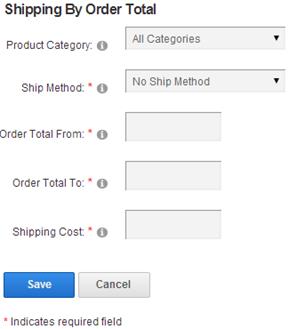
Product Category - Select the category you defined in the category map screen above.
Ship Method – To configure fixed shipping costs by shipping method based on the total order amount select a shipping method from the dropdown list. To add new shipping methods click the link titled “Manage Shipping Methods”. If you want to configure a fixed shipping cost by the total order amount only select “No Ship Method”.
Order Total From - Enter the “Order Amount From” which defines the bottom of the order amount range the cart uses to calculate shipping for the order.
Order Total To – Enter the “Order Amount To” which defines the top of the order amount range the cart uses to calculate shipping for the order.
Shipping Cost – Amount to charge for the shipping for the order amount range entered. Enter a number value without the dollar sign.